[GH-ISSUE #99] Tray icons are invisible and un-clickable #4279

Closed
opened 2026-05-23 00:52:25 +01:00 by JakeStanger · 20 comments
Owner

Originally created by @yavko on GitHub (Apr 4, 2023).
Original GitHub issue: https://github.com/JakeStanger/ironbar/issues/99

Describe the bug

Tray icons are just invisible and un-clickable

To Reproduce
Steps to reproduce the behavior:

  1. Enable tray icons
  2. Don't see anything, cuz they are invisible

Expected behavior

i can click on icons, and see them

System information:

  • Distro: NixOS 23.05
  • Compositor: Hyprland
  • Ironbar version: Latest master (0.11.0 atm)

Configuration

Config
    config = let
      workspaces = {
        type = "workspaces";
        all_monitors = false;
        name_map = let
          workspaces = lib.genAttrs (map (n: builtins.toString n) [1 2 3 4 5 6 7 8 9 10]);
          #fire = "";
          #term = "";
          #music = "󰎈";
        in
          workspaces (_: "●");
      };

      music = {
        type = "music";
        player_type = "mpris";
        format = "{title}";
        truncate = "end";
        #icons.play = "icon:media-playback-start";
        #icons.pause = "icon:media-playback-pause";
        music_dir = config.xdg.userDirs.music;
      };
      sys_info = {
        type = "sys_info";
        format = [" {cpu_percent}%" " {memory_percent}%"];
      };

      tray = {type = "tray";};
      clock = {
        type = "clock";
        format = "%l:%M %P";
      };

      power_button = {
        type = "button";
        name = "power-btn";
        label = "";
        #src = "icon:system-shutdown-symbolic";
        on_click = "popup:toggle";
      };

      uptime = let
        up = pkgs.procps + "/bin/uptime";
      in ''${up} -p | sed "s/up //"'';

      up_full = "{{interval:30000:${uptime}}}";

      power_popup = {
        type = "box";
        orientation = "vertical";
        widgets = [
          {
            type = "label";
            name = "header";
            label = "Power menu";
          }
          {
            type = "box";
            widgets = [
              {
                type = "button";
                class = "power-btn";
                label = "<span font-size='40pt'></span>";
                on_click = "!shutdown now";
              }
              {
                type = "button";
                class = "power-btn";
                label = "<span font-size='40pt'></span>";
                on_click = "!reboot";
              }
            ];
          }
          {
            type = "label";
            name = "uptime";
            label = "Uptime: ${up_full}";
          }
        ];
      };

      power_menu = {
        type = "custom";
        class = "power-menu";

        bar = [power_button];
        popup = [power_popup];

        tooltip = "Up: ${up_full}";
      };

      music_img = rec {
        type = "custom";
        name = "music-img";
        class = name;
        bar = [
          {
            type = "image";
            src = "{{5000:playerctl -p mpd metadata mpris:artUrl}}";
          }
        ];
      };

      nix_launch = rec {
        type = "custom";
        name = "nix-launcher";
        class = name;
        bar = [
          {
            type = "button";
            label = "";
            on_click = "!hyprctl dispatch exec \"zsh -c 'rofi -show drun'\"";
          }
        ];
      };

      left = [
        #focused
        nix_launch
        workspaces
      ];
      right = [
        tray
        sys_info
        power_menu
        clock
      ];
      center = [
        #music_img
        music
      ];
    in {
      anchor_to_edges = true;
      position = "top";
      start = left;
      end = right;
      center = center;
      height = 32;
      icon_theme = config.gtk.iconTheme.name;
    };

Styles
    style = let
      inherit (import ./colors.nix) fg bg red blue maroon subtext0 mantle overlay1;
    in ''
                     * {
                     /*all: unset;*/
                     /* `otf-font-awesome` is required to be installed for icons */
                     /*font-family: Noto Sans Nerd Font, sans-serif;*/
                     /*font-family: monospace;*/
                     font-family: Product Sans, Roboto, sans-serif;
                           font-size: 13px;
                           transition: 200ms ease;

                           /*color: ${fg};*/
                           /*background-color: #2d2d2d;*/
                           /*background-color: ${bg};*/
                           border: none;

                           /*opacity: 0.4;*/
                       }

                       #bar {
                           /*border-top: 1px solid #424242;*/
                      /*height: 20px;*/
                       }

                       .container {
                           background-color: ${bg};
                       }

                       /* test  34543*/

                       #right > * + * {
                           margin-left: 20px;
                       }
                       #left > * + * {
                           margin-right: 10px;
                       }
      					 .nix-launcher button {
      		 all: unset;
      			background-color: ${bg};
      					 }
          .nix-launcher label {
      background-color: ${blue};
      color: ${bg};
      font-family: monospace;
      font-size: 1.5rem;
      padding: 0 1.1rem 0 .5rem;
          }


                   #workspaces {
      							all: unset;
      				margin-left: 10px;
                   }
                   #workspaces label {
             				font-family: Material Symbols Outlined;
      				font-size: 1.2rem;
                   }
                       #workspaces .item {
             							all: unset;
                           color: ${maroon};
                   				margin-right: 5px;
          					padding: 0px;
             							font-family: Material Symbols Outlined;
                       }

                       #workspaces .item.focused {
                           /*box-shadow: inset 0 -3px;*/
                           color: ${red};
                       }

                       #launcher .item {
                           border-radius: 0;
                           background-color: ${bg};
                           margin-right: 4px;
                       }

                       #launcher .item:not(.focused):hover {
                           background-color: ${mantle};
                       }

                       #launcher .open {
                           border-bottom: 2px solid ${blue};
                       }

                       #launcher .focused {
                           color: ${fg};
                           background-color: ${mantle};
                           border-bottom: 4px solid ${blue};
                       }

                       #launcher .urgent {
                           color: ${fg};
                           background-color: ${red};
                       }

                       #clock {
                           color: ${fg};
                           background-color: ${bg};
                           font-weight: bold;
                       }

                       #sysinfo {
                           color: ${fg};
                       }

                       #tray .item {
                           background-color: ${bg};
                       }

                       #music {
                           background-color: ${bg};
                           color: ${fg};
                       }
                       #music label {
                      	font-size: 16px;
      					 }

                       .popup {
                           background-color: ${bg};
                           border: 1px solid ${subtext0};
                       }

                       #popup-clock {
                           padding: 1em;
                       }

                       #calendar-clock {
                           color: ${fg};
                           font-size: 2.5em;
                           padding-bottom: 0.1em;
                       }

                       #calendar {
                           background-color: ${bg};
                           color: ${fg};
                       }

                       #calendar .header {
                           padding-top: 1em;
                           border-top: 1px solid ${subtext0};
                           font-size: 1.5em;
                       }

                       #calendar:selected {
                           background-color: ${blue};
                       }

             					.power-menu {
                 				margin-left: 10px;
             					}

             					.power-menu #power-btn {
                 				color: ${fg};
                 				background-color: ${bg};
             					}

             					.power-menu #power-btn:hover {
                 				background-color: ${mantle};
             					}

             					.popup-power-menu {
                 				padding: 1em;
             					}

             					.popup-power-menu #header {
                 				color: ${fg};
                 				font-size: 1.4em;
                 				border-bottom: 1px solid ${overlay1};
                 				padding-bottom: 0.4em;
                 				margin-bottom: 0.8em;
             					}

             .popup-power-menu .power-btn {
                 color: ${fg};
                 background-color: ${bg};
                 border: 1px solid ${overlay1};
                 padding: 0.6em 1em;
             }

             .popup-power-menu .power-btn + .power-btn {
                 margin-left: 1em;
             }

             .popup-power-menu .power-btn:hover {
                 background-color: ${mantle};
             }

                       #music {
             							all: unset;
                           color: ${fg};
      							 font-size: 16px;
                       }

                       #popup-music #album-art {
                           margin-right: 1em;
                   	border-radius: 20px;
                       }

                       #popup-music #title .icon, #popup-mpd #title .label {
                           font-size: 1.7em;
                       }

                       #popup-music #controls * {
                           border-radius: 0;
                           background-color: transparent;
                           color: ${fg};
                       }

                       #popup-music #controls *:disabled {
                           color: ${overlay1};
                       }

                       #focused {
                           color: ${fg};
                       }
    '';

Additional context

works in trayer

Screenshots

image

Originally created by @yavko on GitHub (Apr 4, 2023). Original GitHub issue: https://github.com/JakeStanger/ironbar/issues/99 **Describe the bug** Tray icons are just invisible and un-clickable **To Reproduce** Steps to reproduce the behavior: 1. Enable tray icons 3. Don't see anything, cuz they are invisible **Expected behavior** i can click on icons, and see them **System information:** - Distro: NixOS 23.05 - Compositor: Hyprland - Ironbar version: Latest master (`0.11.0` atm) **Configuration** <details><summary>Config</summary> ```nix config = let workspaces = { type = "workspaces"; all_monitors = false; name_map = let workspaces = lib.genAttrs (map (n: builtins.toString n) [1 2 3 4 5 6 7 8 9 10]); #fire = ""; #term = ""; #music = "󰎈"; in workspaces (_: "●"); }; music = { type = "music"; player_type = "mpris"; format = "{title}"; truncate = "end"; #icons.play = "icon:media-playback-start"; #icons.pause = "icon:media-playback-pause"; music_dir = config.xdg.userDirs.music; }; sys_info = { type = "sys_info"; format = [" {cpu_percent}%" " {memory_percent}%"]; }; tray = {type = "tray";}; clock = { type = "clock"; format = "%l:%M %P"; }; power_button = { type = "button"; name = "power-btn"; label = ""; #src = "icon:system-shutdown-symbolic"; on_click = "popup:toggle"; }; uptime = let up = pkgs.procps + "/bin/uptime"; in ''${up} -p | sed "s/up //"''; up_full = "{{interval:30000:${uptime}}}"; power_popup = { type = "box"; orientation = "vertical"; widgets = [ { type = "label"; name = "header"; label = "Power menu"; } { type = "box"; widgets = [ { type = "button"; class = "power-btn"; label = "<span font-size='40pt'></span>"; on_click = "!shutdown now"; } { type = "button"; class = "power-btn"; label = "<span font-size='40pt'></span>"; on_click = "!reboot"; } ]; } { type = "label"; name = "uptime"; label = "Uptime: ${up_full}"; } ]; }; power_menu = { type = "custom"; class = "power-menu"; bar = [power_button]; popup = [power_popup]; tooltip = "Up: ${up_full}"; }; music_img = rec { type = "custom"; name = "music-img"; class = name; bar = [ { type = "image"; src = "{{5000:playerctl -p mpd metadata mpris:artUrl}}"; } ]; }; nix_launch = rec { type = "custom"; name = "nix-launcher"; class = name; bar = [ { type = "button"; label = ""; on_click = "!hyprctl dispatch exec \"zsh -c 'rofi -show drun'\""; } ]; }; left = [ #focused nix_launch workspaces ]; right = [ tray sys_info power_menu clock ]; center = [ #music_img music ]; in { anchor_to_edges = true; position = "top"; start = left; end = right; center = center; height = 32; icon_theme = config.gtk.iconTheme.name; }; ``` </details> <details><summary>Styles</summary> ```nix style = let inherit (import ./colors.nix) fg bg red blue maroon subtext0 mantle overlay1; in '' * { /*all: unset;*/ /* `otf-font-awesome` is required to be installed for icons */ /*font-family: Noto Sans Nerd Font, sans-serif;*/ /*font-family: monospace;*/ font-family: Product Sans, Roboto, sans-serif; font-size: 13px; transition: 200ms ease; /*color: ${fg};*/ /*background-color: #2d2d2d;*/ /*background-color: ${bg};*/ border: none; /*opacity: 0.4;*/ } #bar { /*border-top: 1px solid #424242;*/ /*height: 20px;*/ } .container { background-color: ${bg}; } /* test 34543*/ #right > * + * { margin-left: 20px; } #left > * + * { margin-right: 10px; } .nix-launcher button { all: unset; background-color: ${bg}; } .nix-launcher label { background-color: ${blue}; color: ${bg}; font-family: monospace; font-size: 1.5rem; padding: 0 1.1rem 0 .5rem; } #workspaces { all: unset; margin-left: 10px; } #workspaces label { font-family: Material Symbols Outlined; font-size: 1.2rem; } #workspaces .item { all: unset; color: ${maroon}; margin-right: 5px; padding: 0px; font-family: Material Symbols Outlined; } #workspaces .item.focused { /*box-shadow: inset 0 -3px;*/ color: ${red}; } #launcher .item { border-radius: 0; background-color: ${bg}; margin-right: 4px; } #launcher .item:not(.focused):hover { background-color: ${mantle}; } #launcher .open { border-bottom: 2px solid ${blue}; } #launcher .focused { color: ${fg}; background-color: ${mantle}; border-bottom: 4px solid ${blue}; } #launcher .urgent { color: ${fg}; background-color: ${red}; } #clock { color: ${fg}; background-color: ${bg}; font-weight: bold; } #sysinfo { color: ${fg}; } #tray .item { background-color: ${bg}; } #music { background-color: ${bg}; color: ${fg}; } #music label { font-size: 16px; } .popup { background-color: ${bg}; border: 1px solid ${subtext0}; } #popup-clock { padding: 1em; } #calendar-clock { color: ${fg}; font-size: 2.5em; padding-bottom: 0.1em; } #calendar { background-color: ${bg}; color: ${fg}; } #calendar .header { padding-top: 1em; border-top: 1px solid ${subtext0}; font-size: 1.5em; } #calendar:selected { background-color: ${blue}; } .power-menu { margin-left: 10px; } .power-menu #power-btn { color: ${fg}; background-color: ${bg}; } .power-menu #power-btn:hover { background-color: ${mantle}; } .popup-power-menu { padding: 1em; } .popup-power-menu #header { color: ${fg}; font-size: 1.4em; border-bottom: 1px solid ${overlay1}; padding-bottom: 0.4em; margin-bottom: 0.8em; } .popup-power-menu .power-btn { color: ${fg}; background-color: ${bg}; border: 1px solid ${overlay1}; padding: 0.6em 1em; } .popup-power-menu .power-btn + .power-btn { margin-left: 1em; } .popup-power-menu .power-btn:hover { background-color: ${mantle}; } #music { all: unset; color: ${fg}; font-size: 16px; } #popup-music #album-art { margin-right: 1em; border-radius: 20px; } #popup-music #title .icon, #popup-mpd #title .label { font-size: 1.7em; } #popup-music #controls * { border-radius: 0; background-color: transparent; color: ${fg}; } #popup-music #controls *:disabled { color: ${overlay1}; } #focused { color: ${fg}; } ''; ``` </details> **Additional context** works in trayer **Screenshots** ![image](https://user-images.githubusercontent.com/15178513/229667054-61157c94-d772-4110-bc72-b7a9ef4a4dc6.png)
JakeStanger 2026-05-23 00:52:25 +01:00
  • closed this issue
  • added the
    T:Bug
    label
Author
Owner

@JakeStanger commented on GitHub (Apr 7, 2023):

Is this consistently happening, or just a one-off? I know #65 was looking at a potentially related issue where some items don't show, but I've not witnessed it consistently not show anything.

Are you able to try removing icon_theme from your config, and see if the problem still occurs?

<!-- gh-comment-id:1500208194 --> @JakeStanger commented on GitHub (Apr 7, 2023): Is this consistently happening, or just a one-off? I know #65 was looking at a potentially related issue where some items don't show, but I've not witnessed it consistently not show anything. Are you able to try removing `icon_theme` from your config, and see if the problem still occurs?
Author
Owner

@yavko commented on GitHub (Apr 7, 2023):

This happened before I added icon_theme. Its always happening, I can tell when I open more tray applications, more empty buttons are added, but not only are they empty, but they also cannot be interacted with.

<!-- gh-comment-id:1500604541 --> @yavko commented on GitHub (Apr 7, 2023): This happened before I added `icon_theme`. Its always happening, I can tell when I open more tray applications, more empty buttons are added, but not only are they empty, but they also cannot be interacted with.
Author
Owner

@JakeStanger commented on GitHub (Apr 10, 2023):

What apps are you using that are creating (broken) tray items? Just one or two programs I can easily test will be great.

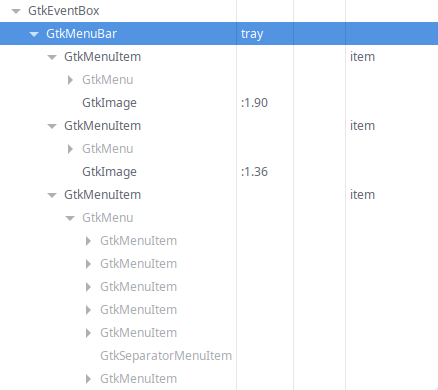
Also, if you use the GTK inspector, does it look like the structure is in tact? It should look something like this:
image

<!-- gh-comment-id:1502197212 --> @JakeStanger commented on GitHub (Apr 10, 2023): What apps are you using that are creating (broken) tray items? Just one or two programs I can easily test will be great. Also, if you use the GTK inspector, does it look like the structure is in tact? It should look something like this: ![image](https://user-images.githubusercontent.com/5057870/230977256-0e2f5a04-d388-4dc8-ba85-185864c4e200.png)
Author
Owner

@yavko commented on GitHub (Apr 11, 2023):

What apps are you using that are creating (broken) tray items? Just one or two programs I can easily test will be great.

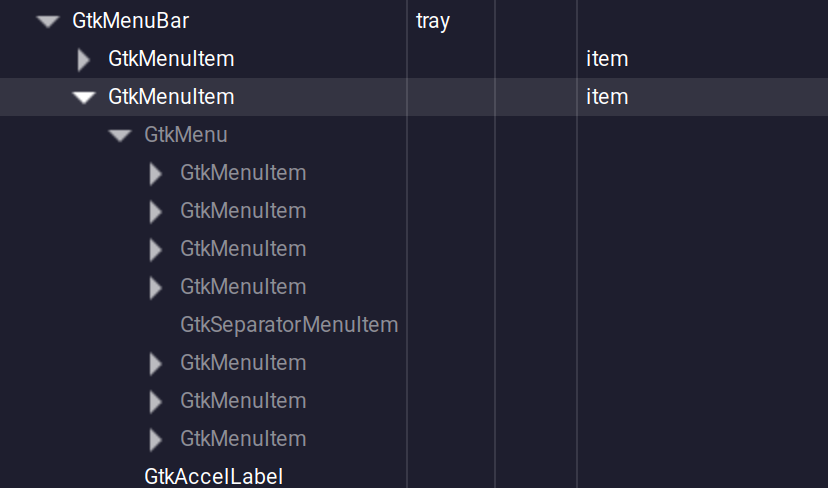
Also, if you use the GTK inspector, does it look like the structure is in tact? It should look something like this: image

nm-tray was one
image

<!-- gh-comment-id:1502503846 --> @yavko commented on GitHub (Apr 11, 2023): > What apps are you using that are creating (broken) tray items? Just one or two programs I can easily test will be great. > > Also, if you use the GTK inspector, does it look like the structure is in tact? It should look something like this: ![image](https://user-images.githubusercontent.com/5057870/230977256-0e2f5a04-d388-4dc8-ba85-185864c4e200.png) nm-tray was one ![image](https://user-images.githubusercontent.com/15178513/231023571-7f4442c9-86d2-46f7-8509-e209069ca47b.png)
Author
Owner

@JakeStanger commented on GitHub (Apr 16, 2023):

So it's generating the whole tree correctly, which is odd (I assume there's a GtkImage element offscreen). Are icons working elsewhere? Like if you add one of the launcher or focused modules, or a custom with just an image with the src of eg icon:firefox, does that show? I'm wondering if this is a NixOS issue where it's failing to resolve the GTK theme.

<!-- gh-comment-id:1510287509 --> @JakeStanger commented on GitHub (Apr 16, 2023): So it's generating the whole tree correctly, which is odd (I assume there's a `GtkImage` element offscreen). Are icons working elsewhere? Like if you add one of the `launcher` or `focused` modules, or a custom with just an image with the src of eg `icon:firefox`, does that show? I'm wondering if this is a NixOS issue where it's failing to resolve the GTK theme.
Author
Owner

@Gajus84 commented on GitHub (Apr 16, 2023):

I'm wondering if this is a NixOS issue where it's failing to resolve the GTK theme.

I'm on Arch and the problem is also existent.

2023-04-16T

The Icon that works is from KDE Connect.

Icons in focused do work.

<!-- gh-comment-id:1510357913 --> @Gajus84 commented on GitHub (Apr 16, 2023): > I'm wondering if this is a NixOS issue where it's failing to resolve the GTK theme. I'm on Arch and the problem is also existent. ![2023-04-16T](https://user-images.githubusercontent.com/44810947/232309424-6f1e11d9-a6d3-417f-93f4-b72f376b224f.jpg) The Icon that works is from KDE Connect. Icons in `focused` do work.
Author
Owner

@JakeStanger commented on GitHub (Apr 16, 2023):

Well there goes that theory then :/

Thanks for the additional info. What compositor are you using? And what icon theme? I'm still not convinced that's not the problem.

I take it neither of you are seeing any errors in the log?

<!-- gh-comment-id:1510372976 --> @JakeStanger commented on GitHub (Apr 16, 2023): Well there goes that theory then :/ Thanks for the additional info. What compositor are you using? And what icon theme? I'm still not convinced that's not the problem. I take it neither of you are seeing any errors in the log?
Author
Owner

@Gajus84 commented on GitHub (Apr 16, 2023):

I'm also on Hyprland. Icon Theme is Adwaita, but I also tried Breeze without any change.

Unfortunately no errors in the log, yes.

Isn't KDE Connect a QT-App? I'm not a pro, but could the icon there come from qt5ct and not directly from the source? IDK if thats a hint or even a thing :D

Edit: In Waybar all icons are shown. The moment I start Ironbar as well, all icons except of the KDE-Connect one disappear. Terminal running Waybar then prompts

[error] Invalid Status Notifier Item: :1.44:1.44, /StatusNotifierItem

<!-- gh-comment-id:1510379129 --> @Gajus84 commented on GitHub (Apr 16, 2023): I'm also on Hyprland. Icon Theme is Adwaita, but I also tried Breeze without any change. Unfortunately no errors in the log, yes. Isn't KDE Connect a QT-App? I'm not a pro, but could the icon there come from qt5ct and not directly from the source? IDK if thats a hint or even a thing :D Edit: In Waybar all icons are shown. The moment I start Ironbar as well, all icons except of the KDE-Connect one disappear. Terminal running Waybar then prompts `[error] Invalid Status Notifier Item: :1.44:1.44, /StatusNotifierItem`
Author
Owner

@JakeStanger commented on GitHub (Apr 16, 2023):

That seems as good a theory as any. I have Dropbox running on my machine, which is QT though, and that does have a working tray icon, so I'm not sure. I've tried KDE Connect on my machine, and I can't get the icon tray to show in either Ironbar or Waybar which is handy.

I think the StatusNotifierItem spec in general seems to be quite finicky and is full of improper implementations. I know Stray, the lib Ironbar uses, has a few problems we've been trying to sort out, and I wouldn't be surprised if apps are incorrectly implementing their end too.

I have just pushed up a commit to master that adds some more debug logging to the icon tray module to try and capture what's going on. If one of you gets a chance, can you try a minimal repro (just the tray module) with IRONBAR_LOG=trace and send me the output to wade through please?

<!-- gh-comment-id:1510459925 --> @JakeStanger commented on GitHub (Apr 16, 2023): That seems as good a theory as any. I have Dropbox running on my machine, which is QT though, and that does have a working tray icon, so I'm not sure. I've tried KDE Connect on my machine, and I can't get the icon tray to show in either Ironbar or Waybar which is handy. I think the `StatusNotifierItem` spec in general seems to be quite finicky and is full of improper implementations. I know Stray, the lib Ironbar uses, has a few problems we've been trying to sort out, and I wouldn't be surprised if apps are incorrectly implementing their end too. I have just pushed up a commit to master that adds some more debug logging to the icon tray module to try and capture what's going on. If one of you gets a chance, can you try a minimal repro (just the tray module) with `IRONBAR_LOG=trace` and send me the output to wade through please?
Author
Owner

@yavko commented on GitHub (Apr 16, 2023):

Oh yeah I also run kde connect, I have 2 hidden icons, so yeah seems kde connect icon just doesn't show

<!-- gh-comment-id:1510464254 --> @yavko commented on GitHub (Apr 16, 2023): Oh yeah I also run kde connect, I have 2 hidden icons, so yeah seems kde connect icon just doesn't show
Author
Owner

@Gajus84 commented on GitHub (Apr 16, 2023):

I have just pushed up a commit to master that adds some more debug logging to the icon tray module to try and capture what's going on. If one of you gets a chance, can you try a minimal repro (just the tray module) with IRONBAR_LOG=trace and send me the output to wade through please?

Here you go.
log.txt

<!-- gh-comment-id:1510473359 --> @Gajus84 commented on GitHub (Apr 16, 2023): > I have just pushed up a commit to master that adds some more debug logging to the icon tray module to try and capture what's going on. If one of you gets a chance, can you try a minimal repro (just the tray module) with `IRONBAR_LOG=trace` and send me the output to wade through please? Here you go. [log.txt](https://github.com/JakeStanger/ironbar/files/11243270/log.txt)
Author
Owner

@JakeStanger commented on GitHub (Apr 16, 2023):

Thanks! It looks you might be right @Gajus84, the icon names are just missing from some tray items, so no image is getting set and the menu item is empty (so has no size, explaining why it's unclickable).

They do provide a pixbuf though, so in theory it should now fall back to that. And if that doesn't exist, it should fall back to displaying the item name. And if that doesn't exist, it'll display the internal address (which is useless, but at least the button will show...).

I don't seem to have anything on my machine that provides the pixbuf data (all my tray items use the icon name), so I've not been able to test the code for the pixbuf actually works. If you get time, are you able to try building #109 and see if that resolves it please?

<!-- gh-comment-id:1510481028 --> @JakeStanger commented on GitHub (Apr 16, 2023): Thanks! It looks you might be right @Gajus84, the icon names are just missing from some tray items, so no image is getting set and the menu item is empty (so has no size, explaining why it's unclickable). They do provide a pixbuf though, so in theory it should now fall back to that. And if *that* doesn't exist, it should fall back to displaying the item name. And if ***that*** doesn't exist, it'll display the internal address (which is useless, but at least the button will show...). I don't seem to have anything on my machine that provides the pixbuf data (all my tray items use the icon name), so I've not been able to test the code for the pixbuf actually works. If you get time, are you able to try building #109 and see if that resolves it please?
Author
Owner

@yavko commented on GitHub (Apr 16, 2023):

As I made a comment on the PR, it doesn't work for me
image

<!-- gh-comment-id:1510489203 --> @yavko commented on GitHub (Apr 16, 2023): As I made a comment on the PR, it doesn't work for me ![image](https://user-images.githubusercontent.com/15178513/232342411-f4c09fbd-cf24-4ded-a13b-59b3af2d368d.png)
Author
Owner

@Gajus84 commented on GitHub (Apr 17, 2023):

Same for me. Here is a new log after applying #109

log.txt

I noticed
icon_theme_path: None on those which are not visible. KDEconnect is different there with a "some" string?

<!-- gh-comment-id:1510673429 --> @Gajus84 commented on GitHub (Apr 17, 2023): Same for me. Here is a new log after applying #109 [log.txt](https://github.com/JakeStanger/ironbar/files/11246141/log.txt) I noticed `icon_theme_path: None` on those which are not visible. KDEconnect is different there with a "some" string?
Author
Owner

@JakeStanger commented on GitHub (Apr 20, 2023):

Oh that's an interesting spot, I wonder if that's what's happening. Cheers for the log too.

I'll probably have a crawl through Waybar's code too since it must be doing the same thing but with more success.

<!-- gh-comment-id:1516945555 --> @JakeStanger commented on GitHub (Apr 20, 2023): Oh that's an interesting spot, I wonder if that's what's happening. Cheers for the log too. I'll probably have a crawl through Waybar's code too since it must be doing the same thing but with more success.
Author
Owner

@JakeStanger commented on GitHub (Apr 21, 2023):

Right, so it seems the actual problem was that my code for reading the pixmap was just broken 🙃 I was able to pull out the pixmap data for one of the broken icons from the log (thanks again) and load that in, and I've managed to copy this project to get the image loading working.

The PR is updated so if you get a chance pls let me know if it works now!

<!-- gh-comment-id:1518375172 --> @JakeStanger commented on GitHub (Apr 21, 2023): Right, so it seems the actual problem was that my code for reading the pixmap was just broken :upside_down_face: I was able to pull out the pixmap data for one of the broken icons from the log (thanks again) and load that in, and I've managed to copy [this project](https://github.com/taffybar/gtk-sni-tray/blob/1927d86308d34b5d21a709cf8ff5332ec5d37de4/src/StatusNotifier/Tray.hs#L175-L182) to get the image loading working. The PR is updated so if you get a chance pls let me know if it works now!
Author
Owner

@yavko commented on GitHub (Apr 22, 2023):

It mostly fixed it, but it looks demonic, I have no clue why. Also low quality icons as I reported in #96
image

EDIT: nextcloud icon icon was red for other reasons, but fcitx5 input one (one that says en) still does

<!-- gh-comment-id:1518483454 --> @yavko commented on GitHub (Apr 22, 2023): It mostly fixed it, but it looks demonic, I have no clue why. Also low quality icons as I reported in #96 ![image](https://user-images.githubusercontent.com/15178513/233758354-0176dbba-b25a-4a0e-b791-8bb6423a413a.png) EDIT: nextcloud icon icon was red for other reasons, but fcitx5 input one (one that says `en`) still does
Author
Owner

@Gajus84 commented on GitHub (Apr 22, 2023):

I can confirm it fixes something. But introduced a new strange behavior as well:

Ironbar after first login:

2023-04-22T06:41:50,190796698+02:00
Note: Last Icon is Udiskie, that should be inactive

Ironbar after killing it and restarting it via Terminal:

2023-04-22T06:43:36,636438556+02:00

Waybar as a comparison looks always like this:
2023-04-22T06:42:45,306120840+02:00
Note: Tutanota is not shown, but still Udiskie

<!-- gh-comment-id:1518510496 --> @Gajus84 commented on GitHub (Apr 22, 2023): I can confirm it fixes something. But introduced a new strange behavior as well: Ironbar after first login: ![2023-04-22T06:41:50,190796698+02:00](https://user-images.githubusercontent.com/44810947/233763174-6b7a294d-5c7a-4ba1-b7a6-755a6af02ec1.png) Note: Last Icon is Udiskie, that should be inactive Ironbar after killing it and restarting it via Terminal: ![2023-04-22T06:43:36,636438556+02:00](https://user-images.githubusercontent.com/44810947/233763208-59c41752-ed2e-40d4-beb1-4f6f691de0bb.png) Waybar as a comparison looks always like this: ![2023-04-22T06:42:45,306120840+02:00](https://user-images.githubusercontent.com/44810947/233763294-0b99da38-56a8-4909-8ce4-5710b15a74a9.png) Note: Tutanota is not shown, but still Udiskie
Author
Owner

@JakeStanger commented on GitHub (Apr 22, 2023):

It mostly fixed it, but it looks demonic, I have no clue why

This is probably related to the scaling, and probably overlaps with #96. Currently the icons are rendered at 16x16 regardless of their original size. I also just picked bilinear scaling without much thought so that might not actually be the best option.

But introduced a new strange behavior as well

I think unfortunately this isn't new, but more likely the first time you've encountered the issues discussed in #84 and #65. There's possibly some kinks in the ironbar logic that need ironing out (ha) but it seems like a lot of the problems are coming from the stray library at the moment.

The ordering is supposed to be more consistent though, so not sure why things are switching around quite so much.

<!-- gh-comment-id:1518584166 --> @JakeStanger commented on GitHub (Apr 22, 2023): > It mostly fixed it, but it looks demonic, I have no clue why This is probably related to the scaling, and probably overlaps with #96. Currently the icons are rendered at 16x16 regardless of their original size. I also just picked bilinear scaling without much thought so that might not actually be the best option. > But introduced a new strange behavior as well I think unfortunately this isn't new, but more likely the first time you've encountered the issues discussed in #84 and #65. There's possibly some kinks in the ironbar logic that need ironing out (ha) but it seems like a lot of the problems are coming from the `stray` library at the moment. The ordering is supposed to be more consistent though, so not sure why things are switching around quite so much.
Author
Owner

@JakeStanger commented on GitHub (Apr 22, 2023):

Since the original issue is resolved, I'll merge the PR and close this. If you have any tray issues you think are not covered by the linked issue/PR, feel free to stick a comment in the issue.

<!-- gh-comment-id:1518584756 --> @JakeStanger commented on GitHub (Apr 22, 2023): Since the original issue is resolved, I'll merge the PR and close this. If you have any tray issues you think are not covered by the linked issue/PR, feel free to stick a comment in the issue.
Sign in to join this conversation.
No milestone
No project
No assignees
1 participant
Notifications
Due date
The due date is invalid or out of range. Please use the format "yyyy-mm-dd".

No due date set.

Dependencies

No dependencies set.

Reference
JakeStanger/ironbar#4279
No description provided.